Specification · Section 0.0 · General

SOP in.
Certified walkthrough out.

Waypoints Studio turns a facility into a self-guiding, self-verifying route. Drop location-anchored waypoints anywhere — each stop narrates itself, answers questions from its own documents, and logs proof of completion to your dashboard. Upload the handbook; the tour drafts itself.

Visitor app
NONE REQUIRED
Triggers
TAP / QR / NFC / GPS
Languages
40+ · ONE CLICK
A modern fabrication floor with rows of CNC machines
FIG. 001 FABRICATION FLOOR, LINE A — ROUTE PLOTTED IN STUDIO, 4 OF 12 WAYPOINTS SHOWN
PD-01 · Authoring
0×
faster to build than a printed guide program
PD-02 · Completion
0%
tour completion when stops are collectible
PD-03 · Languages
0+
languages, translated in one click
PD-04 · Friction
0
apps for workers or visitors to install
1.0 — PROCEDURE SHT 02 / 08

From documents to a live, verified route. Four steps, no print shop.

The commissioning sequence below is the whole job. Scroll: the route plots itself the way it does in the Studio.

STEP 01 / 04

Create the experience

Name it and choose an edition — onboarding, safety walk, museum, campus. One record, one route, one owner.

STEP 02 / 04

AI drafts it from your documents

Upload handbooks, SOPs, floor plans, photos. The system proposes the stops and writes the descriptions, quiz questions, voice narration, and a stamp design per location. You edit a few words.

STEP 03 / 04

Walk the floor and place

Point your phone at each location and tap Place. Anchor by tap, QR, NFC, or GPS — indoors or out. No wiring, no code.

STEP 04 / 04

People walk. The record writes itself.

Workers and visitors collect stamps, ask each stop questions, pass quizzes — and the manager dashboard logs who completed and who passed.

DOCK 01 DOCK 02 DOCK 03 TRAINING RM MUSTER POINT B QA LAB ISO 9001 AREA CHARGING BAY STAGING / KITTING N RACKING A RACKING B FIRE EXT. STN ENTRY / MUSTER A SCALE 20 m 1 2 3 4 5 6
DWG. A-101 ROUTE PLOT — WAREHOUSE SAFETY WALK · 6 WAYPOINTS · DRAWN LIVE ON SCROLL
2.0 — EXHIBITS SHT 03 / 08

The actual product, annotated. Not a mockup.

Below: the Studio editor and the visitor experience as they run today, with keyed notes the way a drawing set calls out its parts.
Waypoints Builder Soft Touch Matte
Selected waypoint
Waypoint 07 · Assembly Line
What happens here — toggle the capabilities on.
Experience blocks
AI Guide Voice narration Video Quiz Badge AR moment
Draft saved · 6 capabilities on · 3 blocks added
FIG. 002 THE WAYPOINTS BUILDER — SOFT TOUCH MATTE
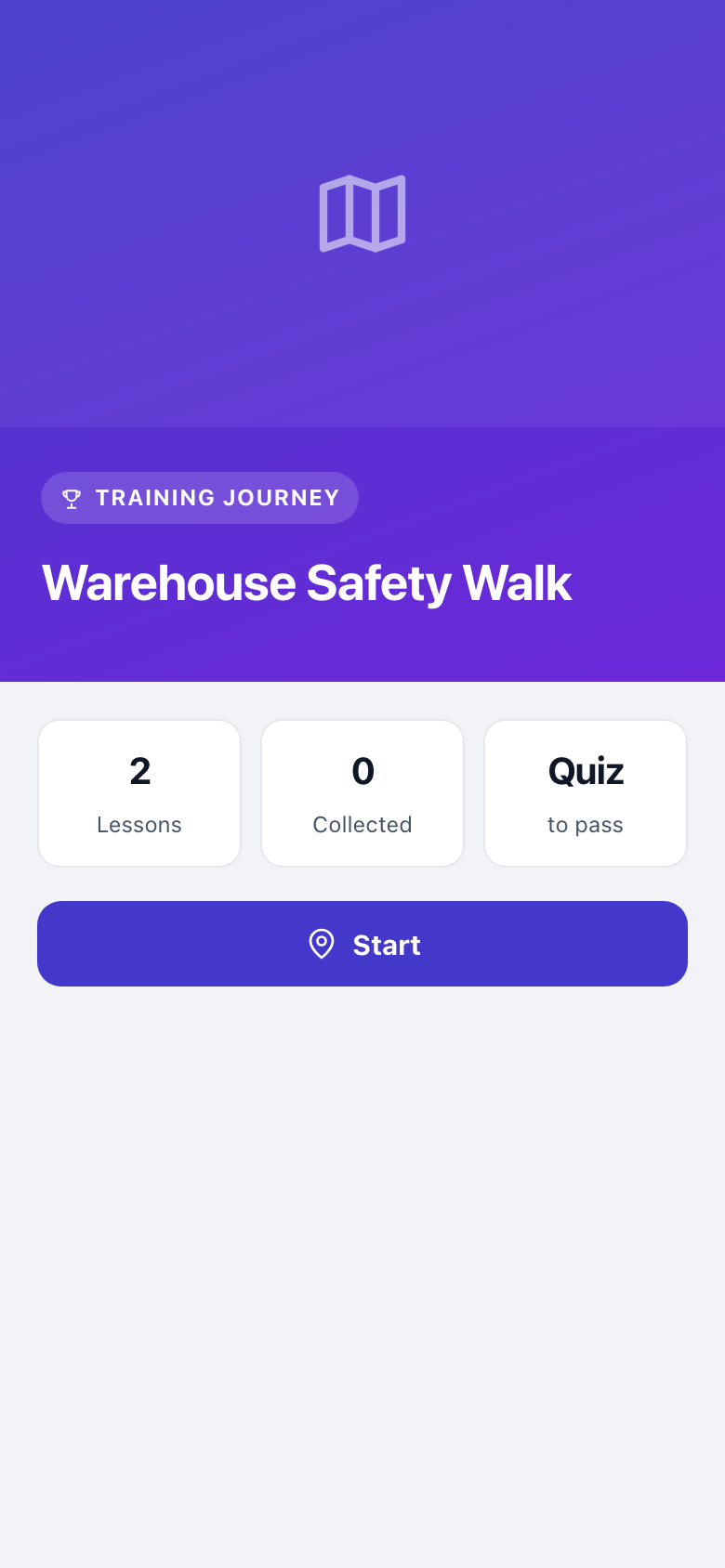
Visitor tour start screen: Warehouse Safety Walk, 2 lessons, 0 collected, quiz to pass, Start button
FIG. 003VISITOR START — LESSON COUNT, COLLECTION TALLY, QUIZ GATE DECLARED UP FRONT
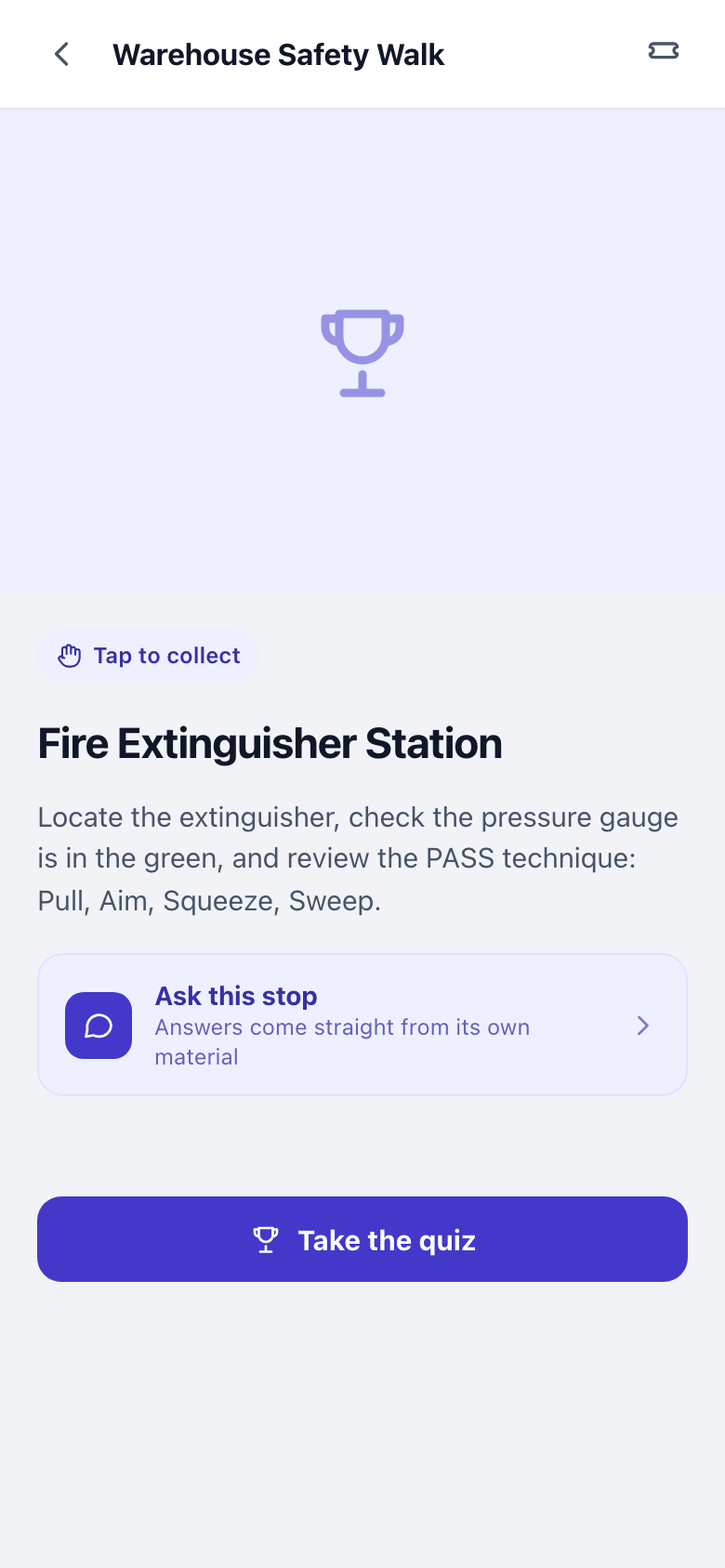
Stop detail: Fire Extinguisher Station with PASS technique instructions, tap to collect, and Take the quiz button
FIG. 004STOP DETAIL — FIRE EXTINGUISHER STATION · TAP TO COLLECT · QUIZ CTA
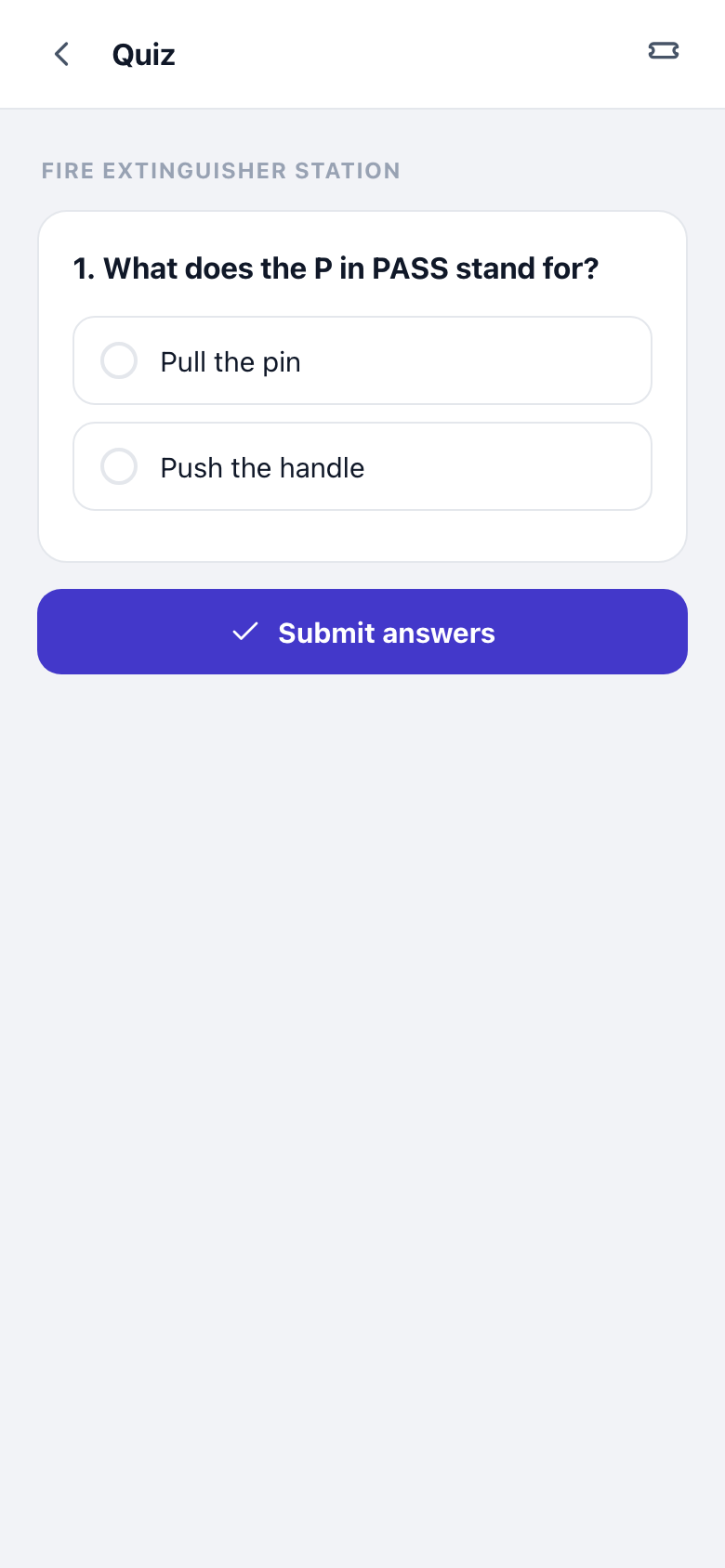
Quiz question screen verifying the worker learned the stop's content
FIG. 005VERIFICATION — QUIZ ITEM; A PASS EARNS THE STAMP AND LOGS TO THE DASHBOARD
3.0 — SYSTEM CAPABILITIES SHT 04 / 08

Seven clauses a laminated placard cannot meet.

One engine behind every experience. The hard parts — authoring, intelligence, tracking, translation — ship as standard.

CL 3.1

AI drafts the whole tour from your SOP

Drop in a handbook, SOP, floor plan, or a folder of photos. The system proposes the stops, writes each description, generates quiz questions, drafts narration, and designs a stamp per location.

Standard · verified
CL 3.2

A talking digital twin at every stop

“Why is the amber light on?” Each stop answers questions grounded only in its own documents — accurate, on-topic, never a generic web guess. The machine finally explains itself.

Standard · verified
CL 3.3

Collectible stamps that finish routes

Every stop issues a unique, themed stamp. Empty slots in the collection pull people to the last waypoint — completion becomes the default outcome, not the exception.

Standard · verified
CL 3.4

Quizzes, certification, manager tracking

Gate any stop with a quiz, require a passing score for the badge, and read the dashboard: who walked, who passed, who is outstanding. The audit trail for onboarding, safety, and OSHA — kept automatically.

Standard · verified
CL 3.5

One-click translation

Publish once, open the entire experience — descriptions, narration, quizzes — in another language instantly. Forty-plus languages; every crew on the floor gets the same walkthrough.

Standard · verified
CL 3.6

Triggers: tap, QR, NFC, GPS

Anchor a waypoint however the site demands — a tap on the map, a scanned code, an NFC tag on the machine guard, or a GPS zone on the yard. Mix triggers within one route, indoors and out.

Standard · verified
CL 3.7

Instant updates — reprints abolished

A part changes, a policy updates, an exhibit rotates: edit the stop and it is live the second you save. The walkthrough is always current in a way nothing laminated can be.

Standard · verified

One engine, any place. You change the content; the system keeps the record.

Open the Studio
4.0 — APPLICATIONS SHT 05 / 08

Specified for the floor first. Rated for everywhere people walk.

Workforce & compliance

Primary duty
A-01

Safety walks & OSHA compliance

Quiz-gated stops with manager tracking. The completion record is the audit evidence.

A-02

New-hire onboarding

Walk new hires through the building and the handbook one stop at a time — day one runs itself.

A-03

Factories & warehouses

Machine-by-machine training that answers questions right on the floor, in the worker’s language.

A-04

Manager dashboards

Who walked, who passed, who is outstanding — live, exportable, no spreadsheet.
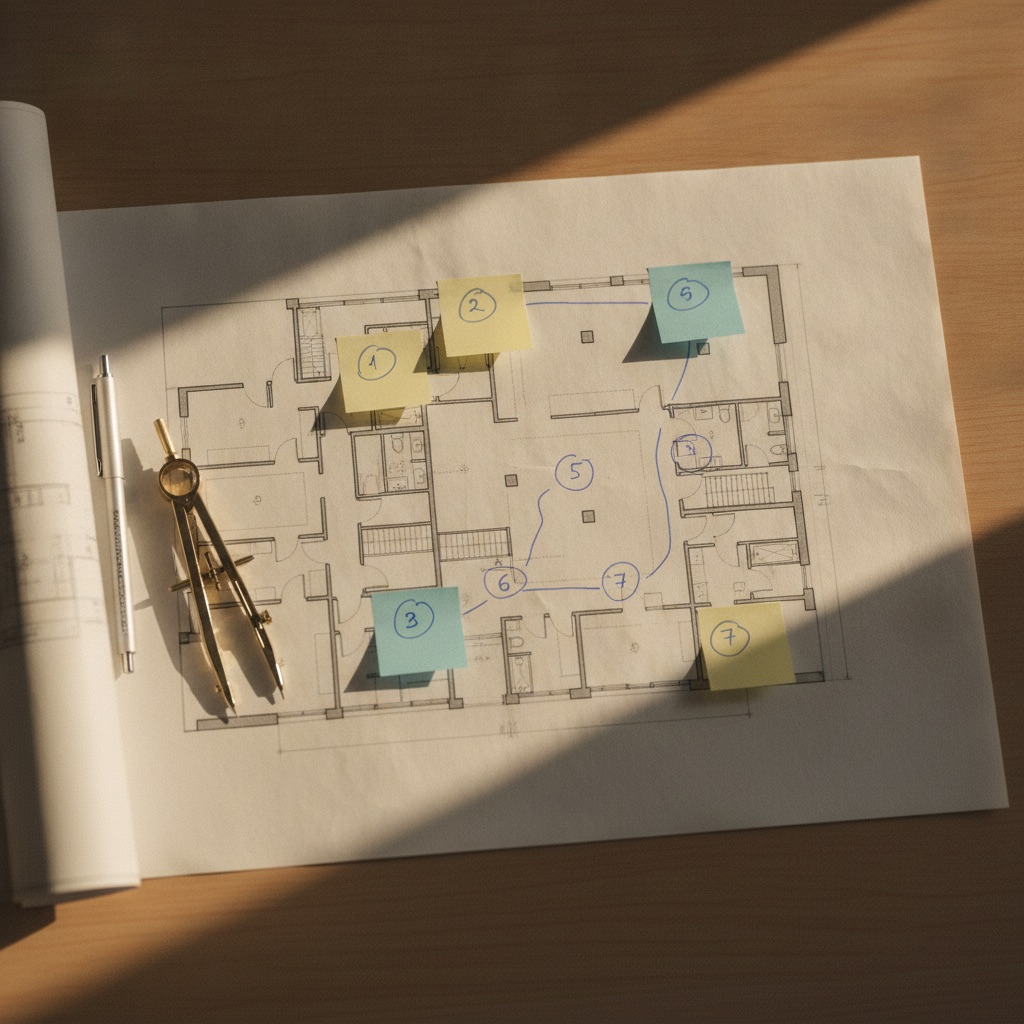
A facility floor plan marked with numbered tour stops connected by a plotted route
FIG. 006AI-PLACED STOPS ON AN UPLOADED FLOOR PLAN — 12 STOPS FROM ONE PDF

Operations & site

Also specified
B-01

Maintenance & lockout/tagout

PM steps and LOTO procedures anchored to the exact machine — the sign-off logs itself.

B-02

Contractor & visitor induction

A site-safety walkthrough every visitor finishes on their own phone before they reach the floor.

B-03

Quality & SOP stations

ISO work instructions right at the station, with a quiz that proves the step was understood.

B-04

Emergency & evacuation routes

Muster points, extinguisher stations, and evac paths as a walkable, verifiable route.

A bright warehouse aisle with tall racking and a loading dock
FIG. 007SAME ENGINE, DIFFERENT ZONE — WAREHOUSE & DOCK, 40+ LANGUAGES ON TAP
5.0 — RECORD OF COMPLETION SHT 06 / 08

Proof, not vibes. The walkthrough writes its own paperwork.

Completion record — Warehouse Safety Walk PERIOD: CURRENT
R. DelgadoSecond shift · receiving 12/12 · 98% PASS
M. ChenFirst shift · line A 12/12 · 91% PASS
A. OseiFirst shift · QA 12/12 · 88% PASS
J. WhitfieldNew hire · day 2 9/12 · — IN PROGRESS
EXPORT: CSV / PDFRETAINED FOR AUDIT
D. Alvarez · EHS
Supervisor sign-off
2026-07-11
Date
Authority stamp

“I uploaded our 40-page safety SOP on a Monday and had a quiz-gated floor tour live by lunch. The manager dashboard alone replaced a spreadsheet I hated.”

Dana Alvarez
EHS Manager · Northridge Mfg.
A pass earns the stamp; the stamp writes the row. No self-reporting, no chasing signatures.
Scores, timestamps, and outstanding walkers in one view — export for the auditor in one click.
Re-certify on a schedule: reissue the route, and the record starts a new period automatically.
6.0 — RATE SCHEDULE SHT 07 / 08

Plans priced like line items. No surprises at commissioning.

Schedule of rates · USD Billed monthly · annual billing waives 2 months No card required to start
6.1

Field Kit

One venue, commissioned.

$149 /mo
14-day free trial · no card needed
Start free trial
  • 1 venue
  • Up to 10 waypoints
  • Core experience blocks — knowledge, narration & journey
  • 14-day free trial
6.2Most chosen

Expedition

Training, engagement & tracking at line scale.

$299 /mo
14-day free trial · billed monthly
Start free trial
  • 25 waypoints
  • Learning + certification
  • Engagement + stamps
  • Multi-language + accessibility
  • Analytics
6.3

Summit

Every block, no ceilings.

$599 /mo
14-day free trial · billed monthly
Start free trial
  • Unlimited waypoints
  • Every experience block
  • AI talking-head guide
  • Multiple editors
6.4Business & Enterprise

Run Waypoints as infrastructure.

Commissioned across lines, plants, and networks — scoped with our engineers.

BUSINESS
from $1,000 /mo

Multiple facilities, unlimited waypoints, more editors & higher visitor volume.

PROFESSIONAL
from $2,500 /mo

Higher usage limits, more editors & analytics.

ENTERPRISE
from $5,000 /mo

Unlimited venues, the highest visitor & usage limits, priority processing.

A full facility deployment typically runs $3,000–$10,000+/month — less than one preventable safety incident.

Book a demo
NOTE 1 — ALL TIERS INCLUDE THE VISITOR EXPERIENCE WITH ZERO INSTALLS. NOTE 2 — UPGRADE OR CANCEL AT ANY TIME.
7.0 — CLARIFICATIONS SHT 08 / 08

Questions of record, answered before you ask them.

RFI-01How do stamps get triggered?
However the site works best. A visitor can tap a stamp on the map, scan a QR code, hold their phone near an NFC tag, or walk into a GPS zone. Triggers mix freely within a single route and work indoors and outdoors. An optional light AR “catch” moment exists for delight — the platform, not AR, is the product.
RFI-02Do visitors need to download an app?
No. Everything runs in the phone’s browser from a link or a scan — no app store, no install, no account required to explore. That is why completion rates hold: zero friction between walking up and collecting the first stamp.
RFI-03Can AI really build the whole tour?
Yes — that is the core of the system. Upload a handbook, an SOP, a floor plan, a brochure, or a set of photos, and it drafts the full experience: proposed stops, written descriptions, quiz questions, voice narration, and a stamp design for every location. You review, edit a few words, and publish.
RFI-04Is my data private, and are the answers accurate?
Your documents are yours. The “Ask this stop” intelligence answers only from the materials attached to that specific stop, so responses stay grounded and on-topic — never a generic web guess. Enterprise adds multiple editors and the higher usage limits scaling across many facilities requires.
RFI-05What happens when content changes?
Edit the stop; it is live the instant you save. No reprinting, no re-stickering, no downtime. A machine gets a new part, a policy updates, an exhibit rotates — change it once and every visitor sees the current version immediately.
RFI-06Can I prove who completed training?
On Expedition and above, yes. Add a quiz to any stop, require a passing score to earn the badge, and the dashboard shows exactly who completed and who passed each experience — the audit trail onboarding, safety, and OSHA programs actually need.
8.0 — Authorization to proceed

Commission your first walkthrough today.

Upload a document, watch the route draft itself, walk the floor, place the stops. Live before the next safety meeting — free for 14 days, no card to start.